Fast Brat Generator
Introduction
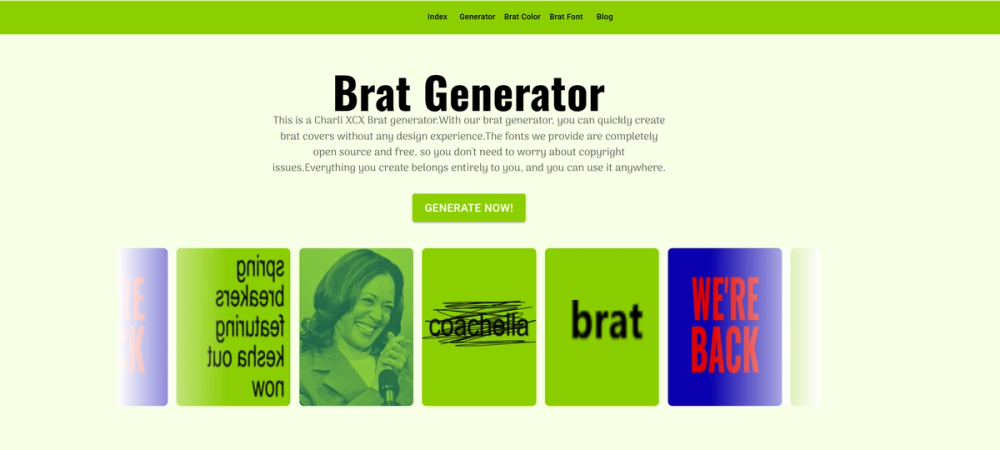
Fast Brat Generator is a browser-based image creation tool built around the visual style associated with Charli XCX's Brat album artwork. Based on the public website, it helps users make brat-style text images, covers, and memes without needing traditional design software or prior editing experience. The product is positioned as a fast, beginner-friendly generator for people who want to create and download customized visuals in this recognizable minimalist style.
Key Features
- Text and image editing on a canvas with drag-and-drop style interaction for quick visual creation
- Support for adding text, uploading local images, and loading images from a URL
- Background editing controls, including canvas color and opacity settings
- Text editing options such as font family, font size, font color, blur, and filter adjustments
- Advanced editing tools including text rotation, flipping, opacity controls, and layer order management
- Camera-style export workflow that allows downloads in different aspect ratios by adjusting the selection frame
- Use of open-source fonts as substitutes for commercial fonts, with the site stating that the fonts are free to use
- Free access according to the public FAQ, with no visible paywall for core generator usage
Use Cases
Fast Brat Generator is best suited for users who want to recreate or remix the brat visual style for personal content, memes, and social media posts. Someone who likes the neon-green album-cover look can use the tool to add custom text, tweak positioning, and produce a shareable image in just a few steps. Because the interface is designed for quick editing rather than deep graphic design work, it fits casual creators who want a themed output without opening a full design suite.
It also works well for social content experiments. The site highlights multiple download ratios, which makes the tool useful for adapting visuals to different platforms and post formats. A user can create a square cover-style image for a feed post or adjust the frame for another screen ratio when preparing a meme or short-form social asset. That flexibility matters for users who publish across different channels but still want a consistent aesthetic.
Another practical use case is novelty or trend-based content creation. The product is clearly built around a niche cultural format, and that can be useful when a specific visual trend is popular and users want a dedicated tool instead of adapting a generic editor. For people who care more about speed and recognizable style than full creative control, this focused setup is likely the main appeal.
Pricing
The public FAQ says Fast Brat Generator is free to use, including the fonts used in the tool. The website also emphasizes that users can freely use and distribute the content they create. At the time of review, the homepage does not show a separate pricing table, paid plan breakdown, or usage limits, so the safest conclusion is that the visible product experience is presented as free. Users who need commercial-use clarity beyond the public statements should still review the site's legal pages before relying on it for broader production use.
User Experience and Support
The overall user experience appears intentionally simple. The homepage describes the workflow as accessible to beginners, and the feature layout supports that claim: users can add objects, edit text, adjust filters, manage layers, and export from a single tool environment. The interface is not framed as a professional design suite, but rather as a focused online editor that makes one style of image fast to produce. That clarity is helpful because it reduces the learning curve for first-time users.
Support is visible in a lightweight, self-serve form. The site includes a FAQ section that answers practical questions such as how to download, delete objects, clear the canvas, and use fonts. There are also standard support links for privacy policy, cookie policy, and terms of service. Based on the public materials, support seems oriented toward straightforward documentation and interface guidance rather than high-touch customer service or team onboarding.
Technical Details
Fast Brat Generator runs as a web-based tool in the browser. Publicly visible functionality includes canvas editing, text insertion, image uploads, image links, filters, opacity controls, and layer management. The export flow is handled through a camera feature that lets users define the area and ratio they want to download, which suggests the product is designed around direct visual composition and browser-based output generation rather than template-only rendering.
The site also states that it uses Google open-source fonts in place of paid commercial fonts, specifically mentioning Arima and Oswald as replacements. Beyond that, deeper technical details such as frameworks, APIs, storage architecture, or integrations are not exposed on the public page. It is therefore best described as a specialized online editor with visible browser-based editing features, rather than as a broader creative platform with documented developer tooling.
Pros and Cons
Pros
- Focused tool for a specific visual style, which makes the workflow clear and easy to start
- Beginner-friendly interface with practical editing controls instead of a complex design environment
- Multiple export ratios help users prepare visuals for different platforms and formats
- Open-source font approach is clearly explained on the public site
- Includes more than basic text editing, with filters, uploads, layer controls, and opacity settings
Cons
- Strongly tied to a niche aesthetic, so it may have limited value outside brat-style content
- Public technical information is limited for users who want deeper product or integration details
- Support appears self-serve rather than comprehensive
- No detailed public pricing or usage-limit breakdown is visible beyond the tool being described as free
Conclusion
Fast Brat Generator is a focused online editor for making brat-style images quickly and with minimal setup. Its strongest advantage is that it turns a specific visual trend into an accessible browser workflow with useful editing controls, flexible export ratios, and no obvious barrier for beginners. For users who want fast meme-style or album-cover-inspired visuals in this niche format, it looks like a practical and easy tool to try.