Introduction
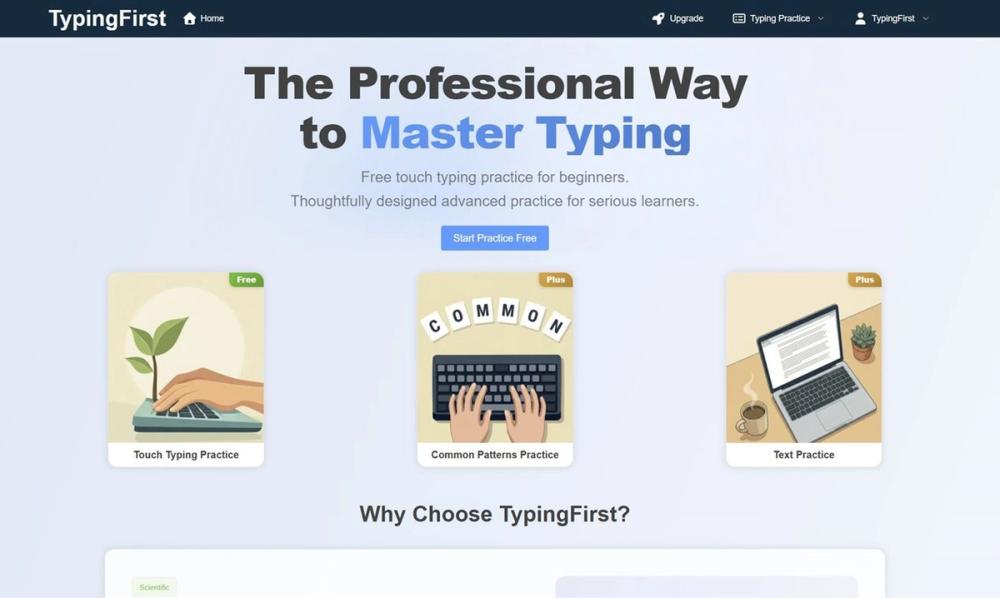
TypingFirst is an online typing practice platform that combines structured touch typing lessons with n-gram drills and paragraph exercises. The curriculum starts with the home row and progresses through complex symbols, using integrated reviews that reinforce previously learned keys alongside new material. The platform offers a free course for beginners and a paid Plus tier that unlocks additional practice modes such as common-pattern drills. TypingFirst is designed for individual learners, classroom use, and anyone who wants to improve typing speed and accuracy with a guided, distraction-free experience.
Key Features
- Touch Typing Practice - lessons built around scientifically proven finger placement techniques, starting from the home row and advancing to symbols and punctuation
- Ngram Typing Practice - drills focused on common letter combinations (n-grams) to build fluency with frequently occurring patterns in real text
- Paragraph Typing Practice - longer-form exercises that simulate actual writing conditions, bridging the gap between isolated drills and real-world typing
- Structured Learning Path - a curriculum designed for muscle memory development, with integrated reviews that combine new keys with previously learned ones to prevent regression
- Visual Performance Analytics - real-time feedback during practice and detailed accuracy and speed analysis after each lesson, including WPM tracking over time
- Weak Key Identification - analytics that highlight specific keys where the user struggles, allowing targeted practice on problem areas
- Gamified Milestones - progress markers that provide motivation as users advance through the curriculum
- Distraction-Free Interface - a minimalist design focused on the typing area and feedback, without ads or visual clutter
Use Cases
Adult beginners who want to learn touch typing from scratch can follow the structured path, which introduces keys incrementally while reinforcing earlier lessons through integrated reviews. The site includes a dedicated article on "Typing Exercises for Adult Beginners" that maps the progression from basic keys to n-grams, common words, and paragraph practice.
Users who have plateaued at a certain WPM can use the n-gram drills and common-pattern practice on the Plus tier to push past their current speed. One user testimonial mentions that the "Common patterns practice" was what helped them break through to 80 WPM after the free lessons had already corrected their bad habits.
Teachers can use TypingFirst with students in a classroom setting, taking advantage of the structured curriculum for beginners while using the analytics to help advanced students continue improving. A testimonial from a technology teacher notes that the structured path works well for beginners and the analytics support top students.
Pricing
The site offers a free course with the option to upgrade to a paid plan:
- Free Course - access to touch typing lessons covering the basics, with real-time feedback and progress tracking; user testimonials indicate the free lessons are sufficient to correct bad habits and build foundational skills
- Plus Upgrade - unlocks additional practice modes such as "Common patterns practice" and other premium drills; the site does not list a specific price on the homepage, and the full feature details are not specified
User testimonials suggest the premium drills are effective for users who want to push beyond basic proficiency. Users interested in the Plus plan should check the TypingFirst site for current pricing and feature details.
User Experience and Support
The platform requires no setup - users can start practice immediately in the browser. The interface is minimalist, with a focus on the typing area and real-time feedback rather than distracting visuals. After each lesson, users receive a comprehensive analysis of their accuracy and speed, along with identification of weak keys. The WPM tracking feature allows users to monitor progress over time.
The site includes helpful articles such as "How Long Does It Take to Learn Touch Typing" and "Why Is My Typing Speed Not Improving," which provide realistic timelines and troubleshooting guidance for common plateaus.
Support details are not clearly visible on the public page. The site does not list specific support channels such as email, live chat, or a help center. Users who need assistance may need to look for contact information on the site directly.
Technical Details
TypingFirst runs as a web-based application with no installation required. The curriculum is designed around muscle memory development, with lessons that introduce new keys while reinforcing previously learned ones. The platform provides real-time visual feedback during typing and detailed analytics after each session. The site mentions "scientifically proven finger placement techniques," though it does not cite specific studies. No mobile app, browser extension, or API access is mentioned. The platform appears to be English-focused based on the available content.
Pros and Cons
Pros
- Free course provides substantial value for beginners
- Structured curriculum with integrated reviews prevents skill regression
- N-gram and paragraph practice modes support progression beyond basic drills
- Visual analytics help users identify weak keys and track WPM growth
- Minimalist interface supports focused practice
- Works well for both individual learners and classroom use
Cons
- Plus plan pricing and full feature list are not visible on the homepage
- Support channels are not clearly listed
- Only the homepage was available for review; detailed feature pages were not fetched
- No mention of mobile app or offline access
- Language support beyond English is not specified
FAQ
What is TypingFirst and who is it for?
TypingFirst is an online typing practice platform that offers touch typing lessons, n-gram drills, and paragraph practice. It is designed for beginners who want to learn proper finger placement, intermediate typists who want to increase their speed, teachers who need a structured curriculum for students, and parents who want their children to develop typing skills.
How does the structured learning path work?
The curriculum starts with the home row and progressively introduces new keys, with integrated reviews that combine new material with previously learned skills. This approach is designed to build muscle memory while preventing users from forgetting earlier lessons as they advance.
What is the difference between the free course and the Plus upgrade?
The free course provides access to touch typing lessons that cover the basics, including real-time feedback and progress tracking. The Plus upgrade unlocks additional practice modes such as "Common patterns practice" and other premium drills aimed at users who want to push past speed plateaus. The exact price and full feature list for Plus are not visible on the homepage.
Can teachers use TypingFirst in a classroom setting?
Yes. The site includes a testimonial from a teacher who uses the platform with technology students, noting that the structured path works well for beginners while the advanced analytics help top students continue improving. Teachers should verify whether any classroom-specific features or pricing are available by checking the site directly.
How does the platform help users identify and fix weak areas?
After each lesson, the platform provides a comprehensive analysis of accuracy and speed, including identification of specific keys where the user struggles. This allows users to focus their practice on weak areas rather than repeating exercises where they already perform well.
What should I verify before upgrading to Plus?
Since the Plus pricing and full feature list are not visible on the homepage, users should check the TypingFirst site for current plan details before upgrading. It may also be useful to complete the free course first to ensure the platform's teaching style matches your learning preferences.
Conclusion
TypingFirst offers a structured approach to touch typing that combines a free foundational course with premium drills for users who want to push beyond the basics. The curriculum's focus on muscle memory, integrated reviews, and weak-key analytics makes it practical for beginners who want to build skills systematically, as well as for intermediate typists who have hit a speed plateau. The main limitations are the unclear Plus pricing and the absence of visible support channels. For anyone who wants to test a structured typing curriculum before committing, the free course on the TypingFirst site is a reasonable starting point.