Introduction
LeadClaw is an autonomous AI sales rep that finds prospects, researches them, writes personalized cold emails, and alerts the user when someone replies with interest. The platform positions itself as the opposite of a traditional email sequencer: instead of building sequences, managing multiple inboxes, and chasing warmup scores, the user pastes their website URL, gets a dedicated AI assistant with its own email address, and receives notifications only when a prospect responds positively. The site describes the product as designed for founders, agencies, and operators who want an AI agent that does the outbound work rather than another tool that still requires manual effort. The founder, Benji Soto, notes that LeadClaw is early-stage with fewer than 100 businesses currently using it.
Key Features
- Autonomous Prospect Research - the AI researches each prospect before writing, looking at company details, recent signals (such as hiring posts), and individual roles, then uses that research to craft a relevant hook
- Hand-Written Email Generation - each email is individually written rather than generated from templates, spintax, or merge-tag patterns; the site explicitly contrasts this with "Hi {{firstName}}" style outreach
- Dedicated AI Assistant with Custom Email - users pick a name for their AI sales rep (e.g., alex@leadclaw.io), and the platform handles SPF, DKIM, and DMARC configuration
- Hot-Lead Alerts - the platform sends a notification when a prospect replies with interest; the user's only task is to follow up on those replies
- Auto-Discovered Leads - the AI finds prospects automatically based on the user's ideal customer profile, with volume varying by plan
- Always-On Operation - the AI sales rep runs 24/7, continuously discovering leads, sending emails, and flagging interested responses
- Campaign Management - run multiple campaigns simultaneously depending on the plan tier
- Upload Your Own Leads - users can supplement auto-discovered leads with their own prospect lists
- CSV and Sheets Export - export lead data for use in other tools or reporting
- Weekly Performance Report - a summary of outreach activity and results delivered on a regular cadence
Use Cases
Founders of service businesses who do not have the bandwidth to manage outbound sales can set up LeadClaw to handle the full pipeline - from finding prospects to writing and sending personalized emails - and only intervene when a hot lead comes in. The three-step setup (paste URL, get an assistant email, receive alerts) is designed for people who want outbound running in the background without daily management.
Agencies that manage outreach for multiple clients can use the multi-campaign capability on the Pro and Ultra plans to run separate campaigns for each client, with each AI assistant tailored to the client's voice and ICP.
Teams that have tried traditional cold email sequencers but found the setup and maintenance overhead too high can use LeadClaw as an alternative where the AI handles prospecting and writing rather than just automating the send schedule. The platform's emphasis on researched, unique emails per prospect addresses a common complaint about sequencer output feeling generic.
Pricing
LeadClaw offers three plans, all with a 7-day free trial and no commitment:
- Starter - approximately 150 leads/month auto-discovered, 10 emails/day (~300/month), 1 active campaign, upload your own leads, always-on operation
- Pro - $89/month or $890/year: 50 emails/day (~1,500/month), 25 fresh leads/day, ~750 leads/month auto-discovered, 3 campaigns running at once, hot-lead email alerts, weekly performance report, CSV export
- Ultra - $209/month: 150 emails/day (~4,500/month), 75 fresh leads/day, ~2,250 leads/month auto-discovered, 10 campaigns simultaneously, send from your own domain, Sheets + scheduled export, priority support (24-hour response)
All plans include a dedicated AI sales agent. The Pro plan is listed as the most popular option. Canceling is done directly from the account with no calls, retention reps, or minimum commitments. Full details are available on the pricing page.
User Experience and Support
The setup process has three steps: paste your website URL so the AI can learn your voice and ICP, pick a name for your AI assistant's email address, and wait for hot-lead notifications. The platform handles email authentication (SPF, DKIM, DMARC) automatically.
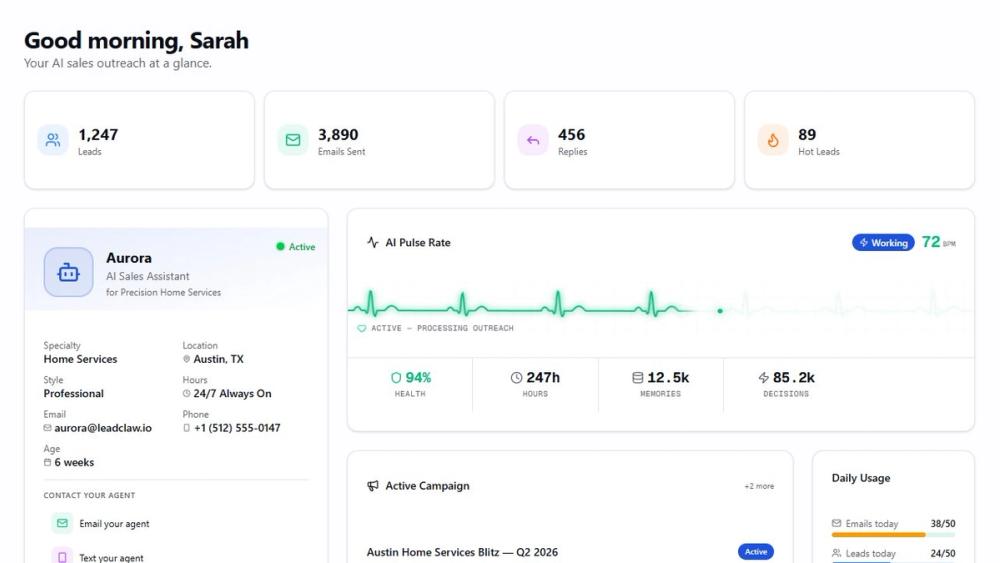
The dashboard shows a live activity feed with recent outreach, replies, and hot leads, along with aggregate stats for leads, emails sent, replies, and hot leads. The AI also appears to learn from results - the site shows an example where the system learned that "subject lines mentioning specific cities get 2.3x more opens."
The founder, Benji Soto, provides a direct support channel: "If you try it and something's broken, email me and I'll fix it." The Ultra plan includes priority support with a 24-hour response time. The site also has a FAQ section.
Technical Details
LeadClaw runs as a web application accessible at app.leadclaw.io. The AI agent researches prospects by scanning company information and recent signals (the site shows an example referencing a LinkedIn post from 4 days ago), then generates unique emails based on that research rather than filling in templates. The platform handles email infrastructure including SPF, DKIM, and DMARC records for the AI assistant's email address. On the Ultra plan, users can send from their own domain. The system operates continuously (24/7) and supports multiple simultaneous campaigns. Lead data can be exported via CSV or integrated with Google Sheets on higher plans. The site does not disclose the underlying AI model, API access, or CRM integrations.
Pros and Cons
Pros
- Autonomous operation - the AI handles prospecting, writing, and sending with minimal user input
- Each email is individually researched and written, not generated from templates or spintax
- Simple three-step setup with email authentication handled automatically
- Hot-lead alerts mean the user only intervenes when there is genuine interest
- Transparent pricing with no minimum commitments and direct cancellation
- Direct founder support for early-stage users
Cons
- Early-stage product with fewer than 100 businesses currently using it
- No visible CRM integrations (HubSpot, Salesforce, etc.)
- No disclosed API or webhook support for custom workflows
- Starter plan is limited to 1 campaign and 10 emails/day
- The site does not specify how the AI discovers leads or which data sources it uses
FAQ
What is LeadClaw and who is it for?
LeadClaw is an autonomous AI sales rep that finds prospects, researches them, writes personalized cold emails, and alerts the user when someone replies with interest. It is designed for founders, agencies, and operators who want outbound sales running in the background without the manual setup and management that traditional email sequencers require.
How does LeadClaw differ from a cold email sequencer?
A sequencer automates the sending schedule but requires the user to build sequences, manage multiple inboxes, and chase warmup scores. LeadClaw's AI does the prospecting, research, and writing itself - the user only interacts when a prospect responds with interest. The site describes this as "the opposite of a sequencer."
How does the AI personalize each email?
The AI researches each prospect before writing, looking at the company, the individual's role, and recent signals such as hiring activity or social posts. It then writes a unique email that references those specifics rather than using templates, spintax, or merge tags. The site shows an example email that mentions a specific hiring event and ties it to the sender's value proposition.
What does the setup process look like?
There are three steps: paste your website URL so the AI can learn your voice and ideal customer profile, pick a name for your AI assistant's email address (the platform handles SPF, DKIM, and DMARC), and then receive email alerts when a prospect replies with interest.
How much does LeadClaw cost?
LeadClaw offers three plans with a 7-day free trial. The Starter plan provides basic outreach volume. The Pro plan is $89/month (or $890/year) with 50 emails/day and ~750 auto-discovered leads/month. The Ultra plan is $209/month with 150 emails/day, ~2,250 auto-discovered leads/month, and priority support. All plans can be cancelled directly from the account.
What should I verify before committing to a paid plan?
Since LeadClaw is early-stage with fewer than 100 businesses using it, the 7-day free trial is the best way to evaluate whether the AI's email quality and lead discovery match your expectations. Users should also check whether the platform integrates with their existing CRM or workflow, as no third-party integrations are mentioned on the public pages. The specific data sources the AI uses for prospect discovery are not disclosed, so testing with your target market during the trial is advisable.
Conclusion
LeadClaw takes a different approach to AI-assisted outbound sales: instead of giving users a smarter sequencer, it provides an autonomous agent that handles prospecting, research, and email writing from start to finish. The three-step setup, hot-lead alerts, and flat pricing with no commitments make it straightforward for founders and small teams to try without a heavy onboarding process. The main considerations are the product's early-stage status, the absence of visible CRM integrations, and the undisclosed lead data sources. For anyone who wants outbound sales running without the overhead of managing sequences and inboxes, the 7-day free trial on the LeadClaw site is a low-risk way to evaluate whether the AI's output quality meets their standards.