Introduction
PNG to Excel is an online converter that extracts tabular data from PNG images and turns it into editable Excel spreadsheets. Hosted at jpg-to-excel.org, the tool is built specifically for screenshots, dashboard captures, exported report images, and scanned forms - situations where a table is locked inside an image file and the user needs clean rows and columns without retyping. Unlike generic OCR tools that return plain text, PNG to Excel focuses on preserving table structure so the output is usable in Excel, Google Sheets, BI tools, and accounting workflows. The platform also offers batch conversion, side-by-side review before export, and a credit-based usage model with free daily access for guests.
Key Features
- PNG Table OCR - extracts rows, columns, headers, totals, dates, and numbers from PNG tables into structured XLSX or CSV files, keeping cells aligned rather than returning a block of plain text
- Side-by-Side Correction - displays the original PNG next to the extracted table so users can review and edit cells before downloading, useful for screenshots with small fonts, compressed images, or mixed text and numbers
- Batch Conversion - upload multiple PNG files and process them as one job, designed for repeated screenshots, monthly reports, product lists, and scan folders
- URL Import - upload a PNG from a direct image URL in addition to local file upload
- Private Conversion History - signed-in users can revisit previous conversions and download results without re-uploading the same image
- Multiple Export Formats - export to XLSX for Microsoft Excel and Google Sheets, or CSV for databases and data workflows
- Related Tools - the platform also offers JPG to Excel conversion, text extraction from images, and handwritten notes to text conversion
Use Cases
Finance and operations teams who can only capture dashboard screenshots from systems that lack CSV export options can use PNG to Excel to convert those images into spreadsheets for reporting. The tool is particularly useful when the source system only provides a visual snapshot, not downloadable data.
E-commerce and inventory teams dealing with product catalogs received as PNG images can extract SKUs, quantities, prices, and inventory tables into Excel for stock checks, catalog cleanup, and pricing comparison. The batch mode handles multiple product images at once.
Researchers and analysts who need to recover data from PNG scans of forms, surveys, or paper tables can extract the information, correct uncertain cells in the side-by-side view, and export a clean file for further analysis.
Pricing
The site offers free access for guests at 3 conversions per day with no login required. Registered users receive 30 credits as a sign-up bonus and gain access to private conversion history. Additional credits can be purchased through the "Buy Credits" option. Specific credit pricing is not displayed on the main page. The free guest tier provides enough capacity for casual users, while teams with regular conversion needs should check the credit pricing before committing.
User Experience and Support
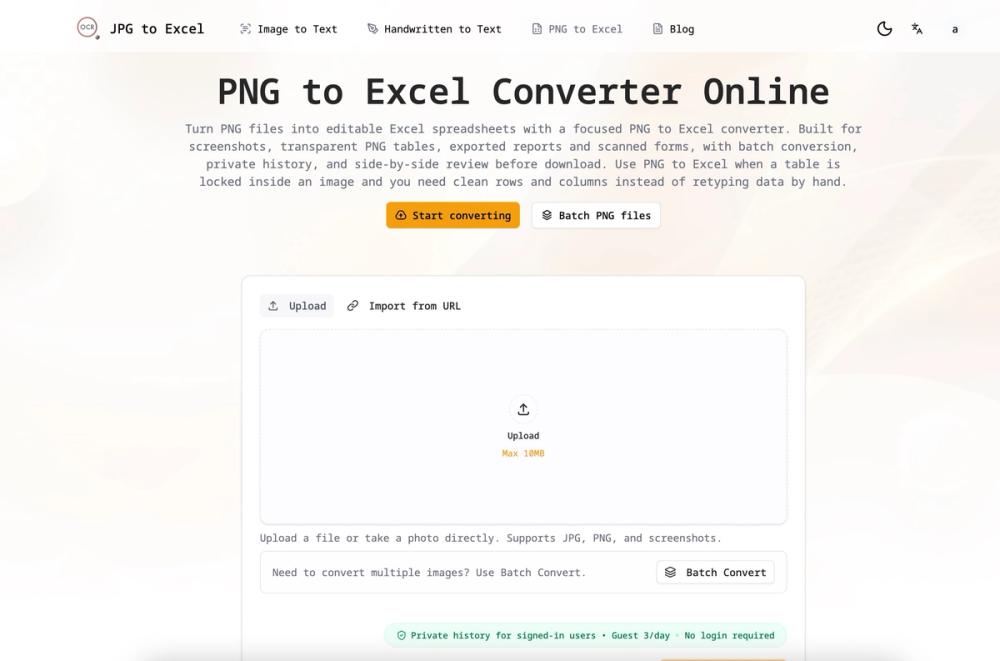
The workflow follows three steps: upload a PNG file (or import from URL), extract the table data via AI, and review before export. The side-by-side comparison view lets users check OCR accuracy and correct cells before downloading. The maximum file size is 10MB. The site supports JPG, PNG, and screenshot inputs. Support and contact options are not prominently visible on the converter page. The platform links to related tools (JPG to Excel, Copy Text from Image, Handwritten Notes to Text) for users who need different extraction tasks.
Technical Details
PNG to Excel uses an AI-based table extraction engine that detects table layout, reads text and numbers, and converts the image into structured rows and columns. The tool is tuned for PNG-specific characteristics: sharp text, thin grid lines, transparent backgrounds, and exported report tables. It aims to preserve cell alignment and table structure rather than just extracting raw text. Export formats include XLSX (compatible with Microsoft Excel and Google Sheets) and CSV (for databases and data pipelines). The site does not disclose the specific OCR engine, AI model, or API availability. The 10MB upload limit applies per file.
Pros and Cons
Pros
- Free guest tier with 3 conversions per day, no login needed
- Side-by-side review lets users correct OCR errors before downloading
- Batch mode handles multiple PNG files in one job
- Focus on table structure preservation makes results usable in real spreadsheet workflows
- URL import option saves time for images already hosted online
- Private history for signed-in users avoids re-uploading the same images
Cons
- Specific credit pricing for paid usage is not visible on the main page
- 10MB file size limit may restrict larger dashboard screenshots or high-resolution scans
- The AI model and OCR engine details are not disclosed
- Support and contact options are not prominently displayed
- Free guest tier limited to 3 conversions per day may be insufficient for regular users
FAQ
What is PNG to Excel and what does it do?
PNG to Excel is an online tool that extracts tabular data from PNG images - such as screenshots, dashboard captures, exported reports, and scanned forms - and converts it into editable Excel spreadsheets (XLSX) or CSV files. It preserves table structure instead of just extracting plain text.
Is PNG to Excel free to use?
Guests can convert up to 3 PNG files per day without logging in. Registered users receive 30 credits on sign-up and access to private conversion history. Additional credits can be purchased, though pricing details are not listed on the main converter page.
How accurate is the PNG to Excel conversion?
The tool uses an AI-based extraction engine tuned for tabular data in PNG images. It provides a side-by-side comparison view where users can review the original image next to the extracted table and correct any OCR errors before downloading. Accuracy depends on image quality - sharp images with visible text and table borders produce better results.
Can I convert multiple PNG files at once?
Yes. The batch conversion feature lets users upload multiple PNG files, process them together, and export results in one step. This is designed for repeated screenshots, monthly reports, and product list images.
What file formats can I export to?
Results can be exported as XLSX (for Microsoft Excel and Google Sheets) or CSV (for databases and data workflows). Both formats produce editable, searchable files.
What is the maximum file size for uploads?
The site states a maximum upload size of 10MB per file. Larger dashboard screenshots or high-resolution scans may need to be resized before conversion.
Does PNG to Excel work with other image formats?
The tool accepts JPG, PNG, and screenshot images. A related JPG to Excel converter is available on the same platform for users working primarily with JPG files.
Conclusion
PNG to Excel fills a specific and practical niche: extracting structured table data from PNG images where the source system only provides a visual snapshot. The side-by-side correction view and batch mode make it more than a simple OCR wrapper - they address the real problem of verifying and fixing extraction results before they enter a workflow. The free guest tier is enough for occasional use, and the credit system scales for teams with regular needs. The main things to verify before relying on it are credit pricing, the accuracy of the OCR engine on your specific image types, and the 10MB file size limit. For anyone who regularly needs to recover table data from screenshots or image exports, PNG to Excel is a focused tool worth trying.