Introduction
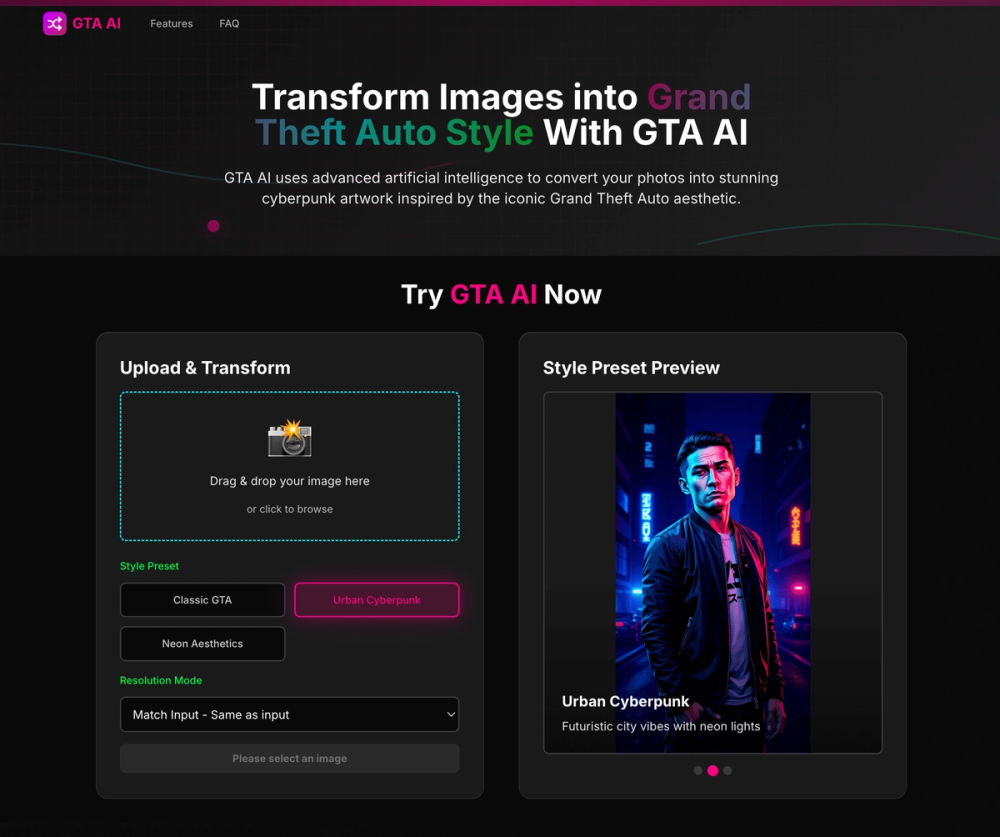
GTA AI is an AI image transformation tool that turns uploaded photos into artwork inspired by the visual style of Grand Theft Auto. The public page presents it as a free GTA AI art generator with seven style presets, high-resolution output, and a simple upload-to-download workflow.
The product appears most relevant for creators, gamers, social media users, and digital artists who want a fast way to create GTA-style portraits, thumbnails, posters, or visual assets. Its clearest value is specialization: instead of offering a broad general-purpose art generator, GTA AI focuses on one recognizable gaming-inspired aesthetic.
Key Features
- Photo upload workflow with drag-and-drop or file selection from the GTA AI homepage.
- Support for JPG, PNG, and WebP image formats up to 10MB.
- Seven visible style presets: General GTA Style, Neon 80s Vice City, Dark Realism, Sunny California, Las Vegas Desert, Next-Gen Realism, and Classic Retro Pixel.
- Advanced settings for aspect ratio, including 16:9, 1:1, 21:9, 3:4, 4:3, and 9:16 modes.
- Model options labeled Pro and Max, with Pro described as faster and balanced, while Max is positioned as higher quality and slower.
- Output claims that include fast processing, high-resolution downloads up to 8K, and artwork suitable for social media, gaming content, wall art, merchandise, and digital collections.
Use Cases
GTA AI is a practical fit for creators who already know the look they want: bold urban color, cinematic character framing, neon lighting, retro game atmosphere, or a stylized crime-world poster feel. Someone making YouTube thumbnails, Twitch overlays, profile pictures, or social posts could use the preset system to get a consistent aesthetic without designing every element manually.
The tool also appears useful for turning ordinary portraits or gaming screenshots into themed visual assets. Because the workflow is built around uploading an image, choosing a preset, and downloading the transformed result, it is more direct than open-ended text-to-image tools. That may appeal to users who want to stylize an existing image rather than generate a scene from scratch.
For print or higher-resolution digital work, the site's mention of 4K and 8K output is worth noting. A careful user should still test actual output quality with their own source images, especially if the final use involves merchandise, large prints, or brand materials where detail and licensing considerations matter.
Pricing
The site title describes GTA AI as a free GTA AI art generator, and the visible page includes a generation interface. However, the same interface also shows sign-in-gated options and model labels such as Pro and Max, so the full pricing or usage-limit structure is not completely clear from the fetched public page. Users should verify whether free use has generation limits, whether higher-quality modes require an account, and what terms apply before depending on it for repeated or commercial work.
User Experience and Support
The user flow is designed to be easy to understand: upload an image, select a GTA-style preset, adjust optional settings, generate, and download. The page also includes a style preset preview, which helps users compare the visual direction before running a transformation. That preview-first design is useful because the available presets are quite different in mood, from sunny California-style looks to darker realism and retro pixel treatment.
Support signals are visible but should be read carefully. The site mentions email support, priority support, tutorials and guides, social media channels, and a Discord community for creators to share work and get feedback. Those are helpful signals for a creative tool, although the public evidence does not show detailed service-level expectations, response times, or documentation depth.
Technical Details
GTA AI says it uses AI-powered style transformation, neural style transfer, deep learning models, and cloud processing to convert user-uploaded images into GTA-style artwork. The page also states that its models are trained on GTA-style images and that the system is built around seven distinct style presets.
From a user-facing technical standpoint, the clearest details are file support, upload size, aspect ratios, model modes, and claimed output resolution. The page does not expose developer APIs, local deployment options, or integration documentation. That suggests GTA AI is primarily a browser-based creative tool rather than a developer platform.
Pros and Cons
Pros
- Focused creative direction for users who specifically want Grand Theft Auto-inspired visuals.
- Clear three-step workflow that should be easy for non-technical users to understand.
- Multiple presets give users more variety than a single fixed filter.
- Supports common web image formats and several aspect ratios for different content formats.
- Discord, tutorials, and guide references suggest some community and learning support.
Cons
- Pricing, free limits, and account requirements are not fully explained in the visible evidence.
- The tool is specialized, so it may be less useful for creators who need broad image-generation styles.
- Claims about high-resolution quality and fast processing should be tested with real images before professional use.
- Legal or brand-use considerations around GTA-inspired artwork are not clearly explained on the public page.
FAQ
What is GTA AI?
GTA AI is an AI art generator that transforms uploaded photos into artwork inspired by the Grand Theft Auto visual style. Its public page focuses on photo-to-art conversion rather than general text-to-image generation.
Who is GTA AI best suited for?
It appears best suited for social media creators, gamers, streamers, digital artists, and casual users who want GTA-style portraits, thumbnails, profile images, or themed visual content from existing photos.
What image formats does GTA AI support?
The public page says GTA AI supports JPG, PNG, and WebP files up to 10MB. That covers the most common image formats used for web and social media workflows.
What GTA AI style presets are visible on the site?
The visible presets include General GTA Style, Neon 80s Vice City, Dark Realism, Sunny California, Las Vegas Desert, Next-Gen Realism, and Classic Retro Pixel. Each preset appears to provide a different visual mood within the GTA-inspired theme.
Is GTA AI free to use?
The page title calls it a free GTA AI art generator, but the interface also includes sign-in-gated elements and Pro or Max model options. Users should check the current access rules before assuming every feature is free.
Can GTA AI create high-resolution artwork?
The site states that users can download up to 8K resolution and also mentions 4K output. If resolution is important for printing or commercial assets, users should test a sample image and confirm what output sizes are available under their access level.
Does GTA AI offer support or a community?
The page mentions email support, priority support, tutorials and guides, social media channels, and a Discord community. The exact support response times and plan requirements are not fully visible, so users should verify them if support is important.
What should creators check before using GTA AI commercially?
Creators should review the site's current terms, usage rights, output ownership rules, and any limitations related to GTA-inspired aesthetics. The visible page describes creative use cases, but it does not fully explain licensing or trademark-related boundaries.
Conclusion
GTA AI is a narrowly focused but useful-looking creative tool for turning photos into Grand Theft Auto-inspired artwork. Its main appeal is the combination of a simple upload workflow, multiple style presets, and output settings aimed at social, gaming, and digital-art use cases.
The biggest items to verify are pricing, usage limits, commercial rights, and actual output quality for your images. If those details fit your needs, GTA AI may be a convenient option for creating stylized visuals without building the look manually.