AI Avatar Maker Review
Introduction
AI Avatar Maker is a web-based tool focused on turning uploaded photos into stylized AI avatars. Based on the public site, it is designed for people who want a fast way to create a digital profile image, character-style portrait, or social-ready avatar without dealing with a complex editing workflow.
The product positions itself around speed, visual variety, and ease of use. The site emphasizes a simple upload flow, example avatars, and one-click style changes, which makes the experience feel aimed at mainstream users as much as creators or gamers.
Key Features
- Photo upload workflow with drag-and-drop support and manual file browsing
- Support for JPG, PNG, and WEBP uploads up to 10MB
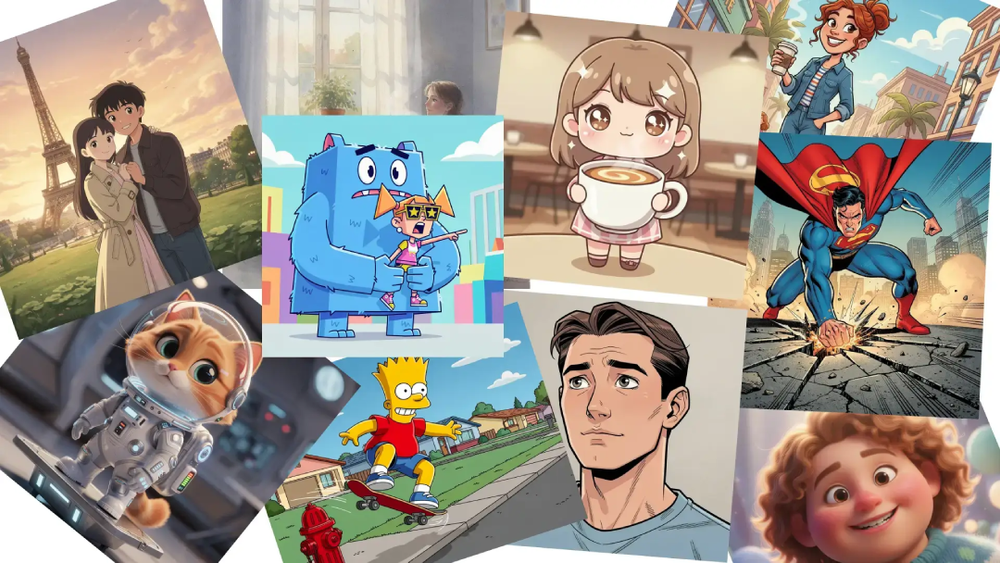
- Multiple visible style categories, including options such as 3D, Cute, Ghibli, Comic, Pixel, and app-avatar style treatments
- Example avatar gallery that gives users a quick sense of the output style before starting
- One-click style transformation flow designed to turn an uploaded image into a new avatar quickly
- Downloadable outputs with visible format mentions including JPG, PNG, and GIF, plus references to normal, HD, and Ultra HD output levels
Use Cases
AI Avatar Maker is best suited for users who need a new digital identity quickly. Social media users can use it to create a more stylized profile picture, while gamers and streamers may find it useful for producing character-inspired images that stand out from standard selfies.
It also fits lightweight creator workflows. Someone building a personal brand, updating a channel profile, or experimenting with different visual identities can test multiple styles without learning traditional illustration tools. The example-based interface lowers the barrier for people who want fast results rather than manual design control.
A third practical use case is simple experimentation. Because the site highlights rapid generation and a range of styles, it appears well suited to users comparing looks for casual sharing, online communities, or profile refreshes across different platforms.
Pricing
Pricing is not clearly exposed in the public site content provided here. There are visible references to premium features and premium resolution options, but the source material does not clearly show plan names, exact costs, billing intervals, or whether there is a free tier.
User Experience and Support
The public page suggests a straightforward user experience. The main interaction starts with uploading a photo, selecting or previewing styles, and generating an avatar. That structure is easy to understand, even for users who have never used an AI image tool before.
The site also appears to include an FAQ-style section and a prompt to contact support for more details. Still, the public evidence does not clearly describe response channels, support hours, onboarding depth, or documentation quality, so those parts cannot be evaluated in detail.
Technical Details
From the visible interface, AI Avatar Maker accepts JPG, PNG, and WEBP uploads with a maximum file size of 10MB. The site also mentions downloadable results in JPG, PNG, and GIF formats, which indicates a browser-based workflow built around common image standards.
Beyond that, the technical stack is not clearly exposed. The site refers to advanced or sophisticated AI processing, rapid generation, and high-quality outputs, but it does not publicly show model details, infrastructure, API access, integrations, or platform-specific implementation information.
Pros and Cons
Pros
- Simple upload-first workflow that should be easy for non-technical users to understand
- Broad range of visible avatar styles for different aesthetic preferences
- Support for common image upload formats and downloadable output formats
- Strong emphasis on fast generation and one-click transformations
- Example avatars help set expectations before a user starts
Cons
- Pricing details are not clearly visible in the provided public evidence
- Premium feature references are present, but plan differences are not well explained here
- No clear public information about integrations, APIs, or advanced customization depth
- Support structure is only lightly mentioned, so service expectations are hard to judge
- Technical implementation details are limited on the public-facing page
Conclusion
AI Avatar Maker presents itself as a fast, accessible way to turn ordinary photos into stylized AI avatars for profiles, creative identities, and casual online use. Its strongest visible advantages are the simple upload flow, varied style options, and broad appeal to everyday users.
For anyone evaluating AI Avatar Maker, the public site gives a solid sense of the core workflow, but it leaves some practical questions unanswered around pricing, support depth, and technical details. That makes it easy to understand what the product does, even if some purchase and platform specifics still need clarification.