Introduction
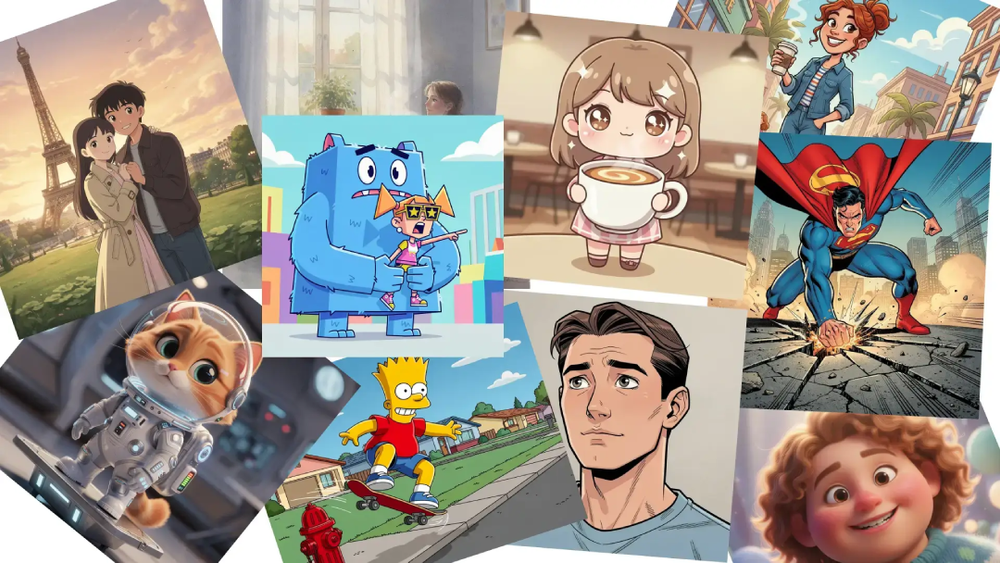
CartoonGenerator.ai presents itself as a photo cartoon generator built for people who want to turn ordinary images into stylized cartoon outputs without a complicated editing workflow. The clearest value on the public site is speed and style variety: upload a photo, choose from looks such as Disney-inspired, sketch, pixel art, anime, Ghibli-inspired, or Pixar-style options, and generate a new version quickly. For casual creators, marketers, and people making avatars or social visuals, that makes the product easy to understand at a glance.
A careful reader should still separate what is clearly visible from what needs confirmation. The site makes the generation flow, pricing structure, supported file formats, and some plan differences fairly clear, but anyone relying on it for professional or large-volume use should still verify output consistency for their own image types and confirm how premium style and resolution options behave across plans.
Key Features
- Photo-to-cartoon generation focused on transforming uploaded images into stylized cartoon visuals.
- Multiple visible styles, including sketch, pixel art, anime, Ghibli-inspired, and Pixar-style options.
- Flexible output settings shown on the site, including aspect ratios such as 2:3, 1:1, and 16:9.
- Resolution options that range from normal HD to higher premium output levels.
- Support for JPG, PNG, and WEBP uploads up to 10MB.
- A credit-based system that combines subscriptions with one-time credit packs for different usage patterns.
Use Cases
CartoonGenerator.ai appears most useful for people who want fast creative image transformations rather than a full illustration suite. Someone making a profile picture, social post, creator asset, or playful branded visual can see the appeal immediately: upload a photo, pick a style, and download a transformed version without learning traditional design software.
The site also suggests a fit for light commercial work. Its pricing FAQ says images generated with subscription credits or purchased credit packs come with commercial use allowed, which could matter for freelance designers, small marketing teams, or content creators who need stylized visuals for campaigns, thumbnails, or promotional posts. That said, commercial users should still test whether the style output matches their brand standards before building a repeatable workflow around it.
There is also a practical fit for users who want volume or repeated experimentation. The visible plan structure includes higher monthly credit tiers, batch generation, and priority generation queues on paid plans, which suggests the product is not limited to one-off novelty use. It looks more suitable for people who expect to try several versions, styles, and aspect ratios across multiple images.
Pricing
The public pricing page is one of the clearer parts of the site. CartoonGenerator.ai shows a free plan at $0 per month with 5 credits upon registration, standard generation speed, watermarked downloads, commercial use allowed, Nano Banana model support, and customer support. The paid Standard plan is shown at $12.99 reduced to $9.99 per month, while a Pro plan is listed at $39.99 reduced to $29.99 per month with 500 monthly credits, priority queue access, fast generation, batch generation, watermark-free downloads, and commercial use allowed. A higher tier with 1800 monthly credits and priority customer support is also visible.
The credit model is explained in useful detail. The site says one high-quality image costs 5 credits, subscription credits reset monthly, and one-time credit packs do not expire. It also says users can upgrade, downgrade, or cancel from account settings. That pricing structure is practical for both occasional users and more regular image generation, though serious users should still confirm how many credits their typical workflow actually consumes when premium settings are involved.
User Experience and Support
The public page emphasizes ease of use. The visible path is straightforward: upload a photo, select a style, choose output options, and generate. The interface language on the site leans into speed and simplicity rather than deep manual control, so the product appears designed for users who want a low-friction creative tool instead of a complex editor.
Support signals are visible, though not deeply documented in the fetched pages. The site mentions customer support, priority customer support on a higher plan, and a help-oriented FAQ section that answers questions about credits, billing changes, commercial use, and payment methods. That is helpful for pre-purchase evaluation, but readers who expect guided onboarding, extensive documentation, or tutorial content should verify how much support is available after sign-up.
Technical Details
The clearest technical details are operational rather than architectural. CartoonGenerator.ai accepts JPG, PNG, and WEBP files up to 10MB, and the public interface shows configurable aspect ratios, image size controls, avatar count options, and multiple resolution settings. Those details matter more to everyday users than the underlying stack because they shape what kinds of source images can be uploaded and how flexible the output can be.
The site also references Nano Banana model support and secure payment processing through Stripe, along with PayPal, Alipay, and WeChat Pay as visible payment options. What the public pages do not make clear is the deeper technical layer: there is no visible API documentation, no developer-facing integration material, and no explanation of how model selection affects style output. If those details matter to a buyer, they are worth confirming before adoption.
Pros and Cons
Pros
- The core use case is immediately understandable: turn photos into cartoon-style images with minimal setup.
- The style library and output options shown publicly make the product feel more flexible than a single-filter novelty tool.
- Pricing is relatively transparent, with visible free access, monthly plans, credit packs, and FAQ explanations.
- Commercial use is stated on the public pricing content, which is relevant for creators and small teams.
- Higher plans visibly include batch generation, watermark-free downloads, and priority handling, which suggests room to scale usage.
Cons
- The public pages say little about output consistency across different photo types, which is something serious users will need to test themselves.
- There is no visible developer documentation or integration detail for users who want CartoonGenerator.ai inside a larger production setup.
- Premium style and resolution behavior may affect value more than the headline monthly price, so the real cost depends on usage patterns.
- The fetched pages focus on the front-end experience and pricing, but they reveal less about edge cases, retries, or generation limitations.
FAQ
What is CartoonGenerator.ai and what does it appear to do?
CartoonGenerator.ai appears to be an image tool that turns uploaded photos into cartoon-style visuals. The public site focuses on transforming photos into avatars and stylized images across multiple looks rather than offering a full manual design editor.
Who is CartoonGenerator.ai best suited for?
It looks best suited for casual creators, social media users, marketers, and small teams that want quick stylized visuals from existing photos. It may also fit freelancers or content teams that need lightweight commercial image generation without a heavy editing workflow.
What can users clearly verify from the public site?
Users can clearly verify that the product supports photo uploads, offers multiple cartoon styles, includes aspect ratio and resolution options, accepts JPG, PNG, and WEBP files up to 10MB, and uses a credit-based pricing model with free and paid tiers.
How does CartoonGenerator.ai pricing work?
The site says one high-quality image costs 5 credits. Users can choose monthly or yearly subscriptions, and they can also buy one-time credit packs that do not expire. The free plan includes 5 credits on registration, while paid plans add more credits and extra benefits such as faster generation or watermark-free downloads.
Can CartoonGenerator.ai be used for commercial projects?
The public pricing FAQ says images generated through subscription credits or purchased credit packs come with commercial use allowed. That is a useful signal, but businesses should still review the current terms directly before using outputs in client or brand-critical work.
Does CartoonGenerator.ai support batch work or heavier usage?
The public plan comparison suggests yes, at least to a point. Higher tiers visibly mention batch generation, priority generation queue access, and larger monthly credit allocations, which makes the product look more suitable for repeated or higher-volume use than the free tier.
What technical or integration details should buyers verify first?
Buyers should verify whether there is any API access, whether output quality is consistent across different image types, and how premium settings change credit usage. Those details are not clearly explained on the public pages, but they can matter a lot for teams building a repeatable workflow.
Conclusion
CartoonGenerator.ai presents a clear and usable proposition: upload a photo, choose a style, and generate a cartoon version with flexible output settings and a visible credit-based pricing model. For people who want quick creative transformations rather than deep editing tools, the public site gives enough detail to make the product easy to evaluate.
The strongest next step is simple: review the main product page and pricing details together, then test a few representative images to see whether the style quality, credit usage, and plan limits match your actual needs.